Setting Up the Engagement System
To start using the engagement system, use the following command:
/engagement-setup
This command will guide you through the initial setup, including:
- Selecting a channel to track for XP -
/engagement-channel-setup - Setting a notification channel for level-ups -
/engagement-setup message-channel:#general notification-channel: - Defining the base required XP for leveling up -
/engagement define-role-xp - Naming your points currency -
/engagement-setup message-channel:#general points-name: - Setting the points-to-XP ratio -
/engagement-setup message-channel:#general points-per-xp: - Enabling or disabling the shop feature -
/engagement-setup shop-enabled:True
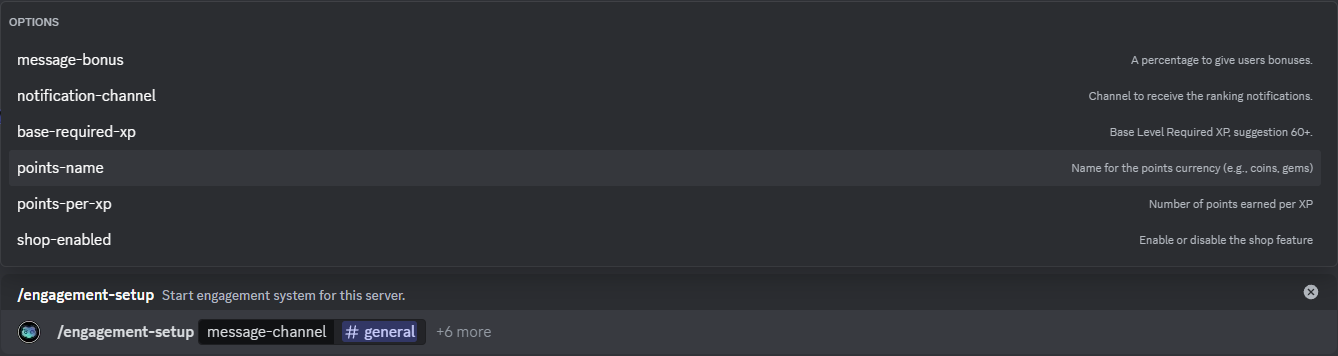
Further Description along with the Images is provided in the following pages!
Managing from the TekTools dashboard
Everything above can also be configured from the TekTools website — no Discord commands needed. Open your server's dashboard and go to Engagement System:
- Setup — tracked message and reaction channels (with per-channel XP bonuses), the notification channel, base required XP, points currency name, points-per-XP ratio, and role XP bonuses.
- Shop — enable the shop, purchase notifications, and manage shop items.
- Admin Actions — give or remove XP and points, and reset levels.
- Reports — leaderboard (with CSV export), recent purchases, and per-item reports.
Changes made on the dashboard and through Discord commands are always kept in sync — both edit the same configuration.