Poll/Voting System
With our voting system you can have anonymous voting in your server, you can allow only specific roles to respond and create polls.
First thing you need to do is setup the voting system in your server, and to do that, run the following command.
/vote-setup
| Parameter | Description |
|---|---|
| Role | A role to interact and create polls. |
| voting-channel | The channel the poll message will be sent |

Voting setup
After you run the setup command, you will receive a confirmation email like this.
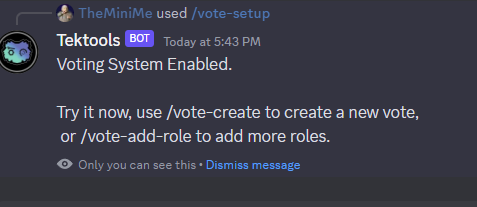
You are now able to start creating polls, don't forget you need to have the role you selected in the setup to be able to run the /vote-create command.
Creating polls.
Run the following command to create a poll.
/vote create
| Parameter | Description |
|---|---|
| poll-question | The question or statement you want people to vote on |
| poll-options | The possible answers people can pick from to answer your poll |
| poll-duration-time | The time the poll will stay open in, hours or days, you need to use h or d to represent it. |
Example:

This is the poll available for people to vote on after you submit the /vote-create command.
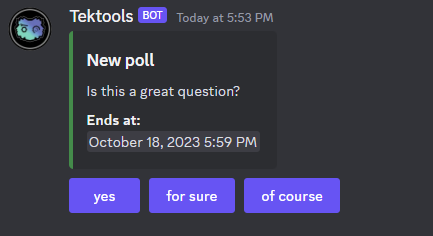
And this is when the time expires how the system display the results.
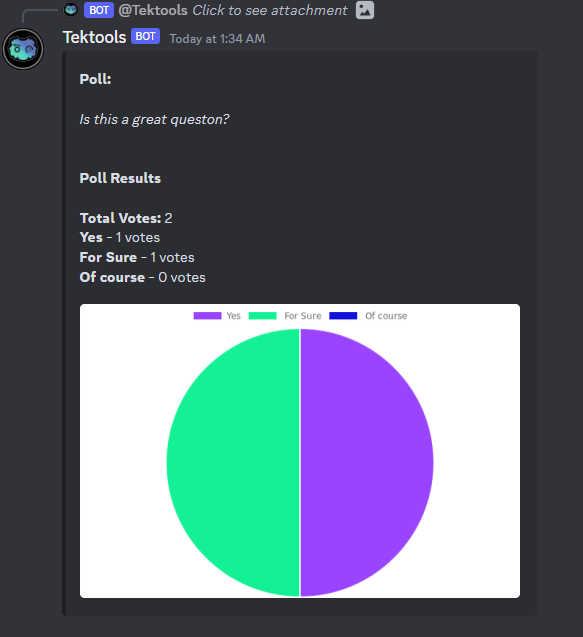
Adding extra roles
This is the last command available on the voting system that allows you to add more roles to be able to create and vote on polls.
/vote-add-role
| Parameter | Description |
|---|---|
| Role | A role to interact and create polls. |
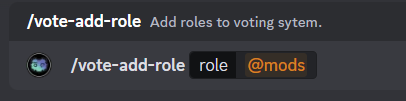
Watch below a demonstration on how to setup the poll system, add extra roles and create a new poll for members of your server to vote on.